FOPETT Keyboard and Mouse Sets
Colorful wireless keyboard and mouse sets with round, typewriter-style keys. One small USB receiver runs both the keyboard and the mouse, with no software to install.
- Connection2.4 GHz, one USB receiver for both
- Layouts68, 100, 104 or 105 keys
- Range28 to 33 ft, by model
- SetupPlug and play, no drivers
FOPETT Keyboard Models
We make seven kinds of keyboards. Most are wireless sets that come with a matching mouse, and each card opens that color on Amazon.
Full-Size Round Keycap SetsGradient SetsSwitch Button SetsCompact 68-Key SetsWired 8870P SetsRGB Tri-Mode KeyboardErgonomic Split Set
Full-Size Round Keycap Sets
The classic FOPETT look: a full-size keyboard with round, typewriter-style keycaps and a matching quiet mouse. One nano receiver runs both, and it travels in the bottom of the mouse.
 FOPETT Milk Tea View on Amazon
 FOPETT White Colorful View on Amazon
 FOPETT Pink View on Amazon
 FOPETT Black Colorful View on Amazon
 FOPETT Black Red View on Amazon
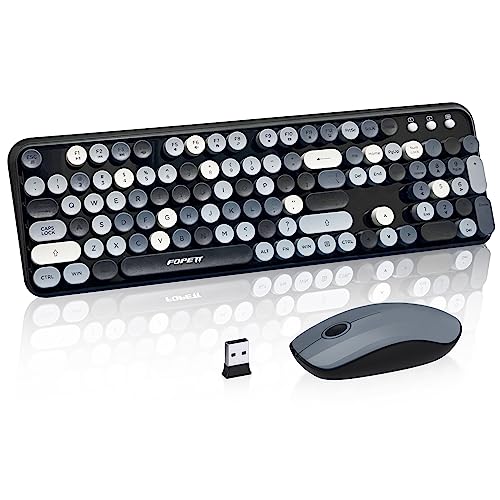 FOPETT Grey Colorful View on Amazon
 FOPETT Black Colorful, 105 Keys View on Amazon
 FOPETT Gradient Green View on Amazon
 FOPETT Black Purple View on Amazon
Gradient Sets
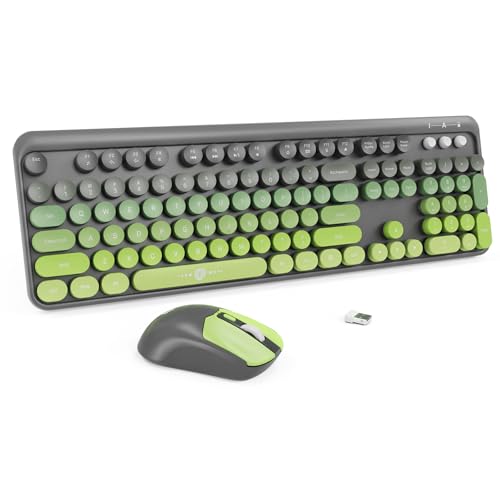
104 round keys in a color fade from light to dark. The mouse has three DPI levels (800, 1000 and 1600), and both devices sleep after 60 seconds idle and wake on any key.



Switch Button Sets
Our largest set, with 105 keys and a power switch on the keyboard that saves the batteries. Its splash-resistant design lets liquid drain out of the keyboard.


Compact 68-Key Sets
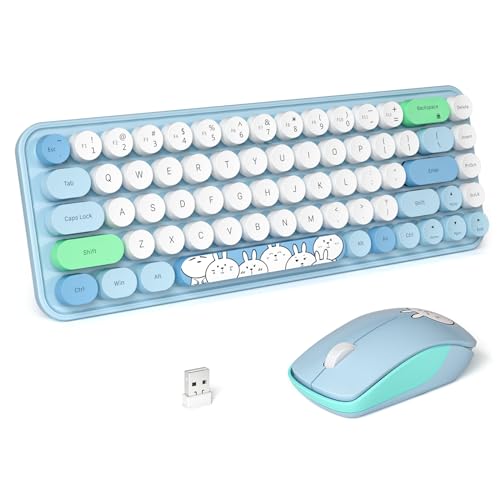
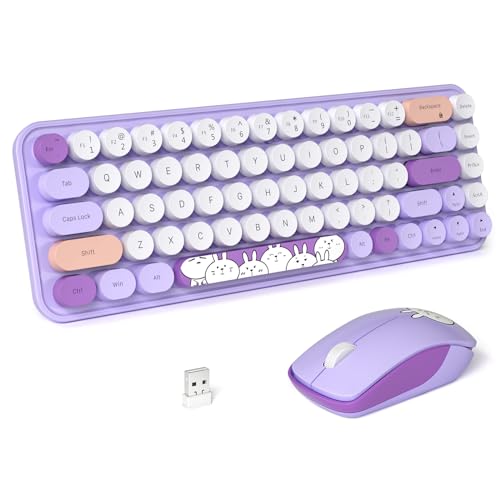
A small keyboard for tight desks: 68 keys, 12 of them multimedia hotkeys. The keyboard and the mouse each have a power switch, and the batteries come in the box.
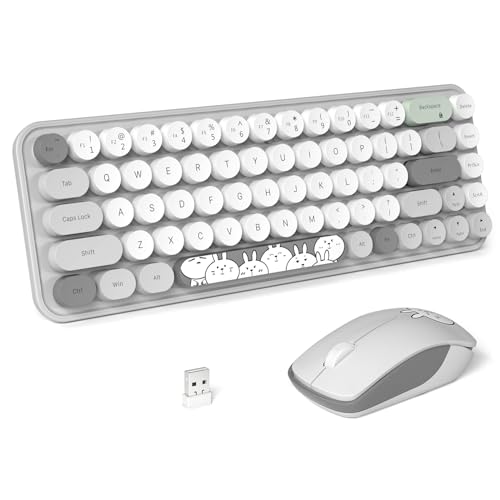


Wired 8870P Sets
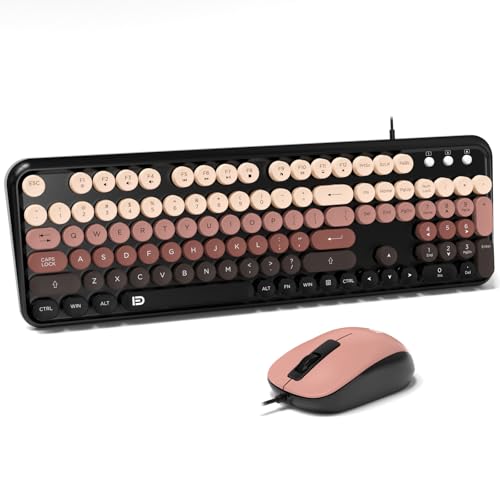
The same round keycaps on a USB cable, so there are no batteries and no receiver. Foldable feet set the typing angle, and 12 hotkeys handle media, email and search.


RGB Tri-Mode Keyboard
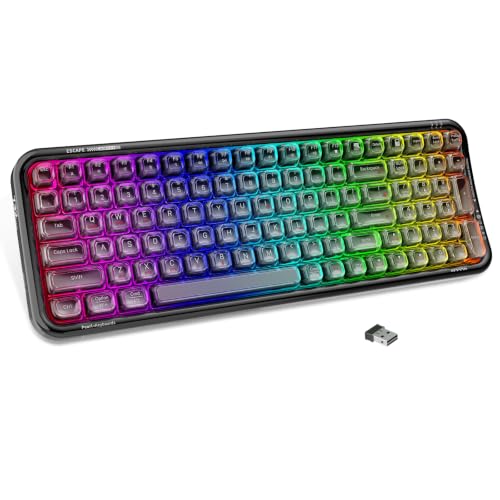
A backlit keyboard with semi-transparent keycaps that connects three ways: Bluetooth 5.0, the 2.4 GHz receiver or a USB-C cable. A built-in 1500 mAh battery charges by cable. It is a keyboard only, without a mouse.


Ergonomic Split Set
A curved, split keyboard with a wrist rest and foldable feet, sold with an ergonomic mouse. Both share one nano receiver with a range of up to 33 ft.

How to Choose a FOPETT Keyboard
Start with how much desk you have and how you want to connect. After that it is a matter of color.
| Model | Keys | Connection | Power | Best For |
|---|---|---|---|---|
| Full-Size Round Keycap Sets | 104 or 105, by color | 2.4 GHz USB receiver | 1 AA in the keyboard, 1 AA in the mouse (not included) | A full keyboard with a number pad and the widest choice of colors |
| Gradient Sets | 104 | 2.4 GHz USB receiver | 1 AA in the keyboard, 1 AA in the mouse (not included) | A calmer one-color look, with three mouse speeds |
| Switch Button Sets | 105 | 2.4 GHz USB receiver | 2 AAA in the keyboard, 1 AA in the mouse (not included) | Turning the keyboard off between uses, and desks where drinks get spilled |
| Compact 68-Key Sets | 68 | 2.4 GHz USB receiver | 2 AAA in the keyboard, 1 AA in the mouse (included) | Small desks, laptops and tablets |
| Wired 8870P Sets | 104 | USB cable | From the USB port, no batteries | Never changing a battery |
| RGB Tri-Mode Keyboard | 100 | Bluetooth 5.0, 2.4 GHz receiver or USB-C cable | Built-in rechargeable 1500 mAh battery | Bluetooth devices and backlit keys. Keyboard only, no mouse |
| Ergonomic Split Set | 104 | 2.4 GHz USB receiver | See the Amazon listing | Long typing days, with a wrist rest |
Key Features of FOPETT Wireless Keyboard and Mouse Sets
Compact Full-Size Design
Full-size function in a compact body. Depending on the model you get 100 to 105 keys, with 12 or 13 multimedia hotkeys for quick access to your favorite functions.
Silent and Quiet Typing
A shorter keystroke path makes typing quieter, and the mouse clicks are close to silent, so you can work without disturbing the people around you.
Power-Saving Features
The keyboard and the mouse go into power-saving mode on their own when idle and wake when you press a key. Some sets also have a power switch.
2.4 GHz Wireless Connectivity
A dependable 2.4 GHz wireless connection with a range of 28 to 33 feet, depending on the set.
Retro Round Keys and Ergonomic Comfort
Typewriter-inspired round keys on a low-profile keyboard with a tilted typing angle. The rounded mouse gives a comfortable grip during long sessions.
Wide Compatibility
Works with Windows PCs and laptops, MacBooks, Chromebooks and Smart TVs that have a USB port. On a Mac, some hotkeys may not work fully.
Warranty and Support
Our wireless sets carry a three-year warranty and a 60-day money-back or replacement option. If something goes wrong, message us through your Amazon order.
How to Connect a FOPETT Keyboard and Mouse
Our wireless sets connect on their own. There is no Bluetooth pairing and nothing to install: the keyboard and the mouse both talk to one small USB receiver.
-
Put In the Batteries
Most full-size sets take one AA in the keyboard and one AA in the mouse. Switch Button and compact 68-key sets take two AAA in the keyboard and one AA in the mouse. Only the compact sets come with batteries.
-
Find the USB Receiver
The nano receiver is stored in the bottom of the mouse. One receiver runs both the keyboard and the mouse.
-
Plug It Into a USB Port
Plug the receiver into a USB port on your computer and give it a few seconds to set itself up. No software or drivers are needed.
-
Switch On and Type
If your set has a power switch (Switch Button and compact 68-key sets), slide it on. Other sets wake up when you press any key.
If the Keyboard or Mouse Is Not Working
- Check the Batteries FirstWeak batteries are the usual cause. On the round keycap sets a low-battery light in the top right corner of the keyboard tells you when to replace them.
- Wake It UpBoth devices sleep when idle. Press any key or click a mouse button and wait a few seconds.
- Check the Power SwitchOn sets that have one, make sure the switch on the keyboard and on the mouse is on.
- Check the ReceiverMake sure the receiver is pushed all the way into the USB port, or try another port. Stay within range: 28 to 33 feet, depending on the set.
- Only the Keyboard or Only the Mouse StoppedEach device has its own battery, so change the battery in the one that stopped.
- Lost the USB ReceiverThe keyboard and the mouse share one receiver. If it is lost or damaged, message us through your Amazon order and we will help.
What About Bluetooth?
Only the RGB Tri-Mode keyboard has Bluetooth. The round keycap sets connect through their USB receiver, so they need a USB port. For a device with only USB-C, use a USB-C adapter, which is not in the box.
What Our Clients Say
FOPETT keyboards and mice are in demand and have received good reviews. Here are just a few of them.
This keyboard is so fun! I had the orange one & wanted to try something new. Both colors look good in person and I always get compliments at work!
I love my keyboard and mouse I love that it has no cords and comes in many colors.
Love this keyboard/mouse combo. Took a little getting used to with the elevation of the keys, but once I did, I love it! Springy, but no "clack" to bother my office mate. Beautiful. And works perfectly with my work laptop.
Why Choose FOPETT
Diverse Selection
A wide range of options: colorful designs, different ways to connect and ergonomic features.
Budget-Friendly
FOPETT keyboards are known for being affordable, so they fit many budgets without giving up quality.
Reliable Connectivity
Our 2.4 GHz wireless technology gives a reliable connection to a PC, a laptop or a Smart TV.
Quality and Durability
Solid construction made for daily typing and long-lasting performance.
Additional Features
Many sets come with extras such as colorful keycaps, power switches and ergonomic designs.
Questions About FOPETT Keyboards
What is FOPETT?
FOPETT is a brand of colorful computer keyboards and keyboard and mouse sets sold on Amazon. It is best known for wireless sets with round, typewriter-style keycaps that connect through one 2.4 GHz USB receiver.
How do I connect a FOPETT keyboard?
Put in the batteries, take the nano receiver out of the bottom of the mouse and plug it into a USB port. The keyboard and the mouse connect on their own within a few seconds, with no software to install.
How do I turn on a FOPETT keyboard?
Switch Button and compact 68-key sets have a power switch on the keyboard. Other wireless sets wake from power-saving mode when you press any key, so if nothing happens, check the batteries.
Is the FOPETT keyboard Bluetooth?
Most are not. The round keycap sets use a 2.4 GHz USB receiver instead of Bluetooth. The RGB Tri-Mode keyboard is the exception: it connects by Bluetooth 5.0, by the 2.4 GHz receiver or by a USB-C cable.
Can I connect a FOPETT keyboard without the USB receiver?
Not the round keycap wireless sets, which only talk to their USB receiver. If your device has no USB-A port, use a USB-C adapter with the receiver or choose the RGB Tri-Mode keyboard, which has Bluetooth.
Why is my FOPETT keyboard not working?
Start with fresh batteries, then press a key to wake the keyboard and check that the receiver is plugged in and within range. If only the keyboard or only the mouse stopped, change the battery in that device.
What if I lose the FOPETT USB receiver?
The keyboard and the mouse share one USB receiver. If it is lost or damaged, message us through your Amazon order and we will help you with a solution.
What batteries does a FOPETT keyboard use?
Most full-size sets use one AA battery in the keyboard and one in the mouse. Switch Button and compact 68-key sets use two AAA in the keyboard and one AA in the mouse. The RGB Tri-Mode keyboard has a built-in rechargeable battery, and wired sets need none.
Does a FOPETT keyboard work with a Mac, a Chromebook or a Smart TV?
Yes. They work with Windows PCs and laptops, MacBooks, Chromebooks and Smart TVs that have a USB port. On a Mac, some hotkeys may not work fully.
Are FOPETT keyboards quiet?
Yes. The keyboards have low-profile keys with a short keystroke, and the mice click almost silently, so they suit shared offices and homes.
What warranty do FOPETT keyboards have?
Our wireless sets come with a three-year warranty and a 60-day money-back or replacement option. To use it, contact us through your Amazon order.
Where can I buy a FOPETT keyboard?
On Amazon. Every card on this page opens the Amazon listing for that model and color.
Contact
Have a question about your keyboard or mouse? Write to us.